Your computer is probably the closest piece of technology to your body most days. It sits on your desk within arm’s reach, travels with you as a laptop on the sofa, and sometimes even ends up next to your bed. Along with emails, video calls, and endless tabs, there is something you don’t see but live with for hours every day: EMF from your computer.
Electromagnetic fields, or EMF, are a natural byproduct of every powered device, from the power supply in your desktop to the Wi-Fi module in your notebook. On their own, these fields are not a reason to panic, but long, close-up EMF exposure can become another piece in the puzzle of why you feel wired at night, struggle to fall asleep after late-night work, or leave your home office with a dull headache more often than you’d like. Computer radiation is not the only factor that matters for your well-being, yet it is one of the easiest to overlook.
The good news is that you don’t need to move into a cabin in the woods or give up your favorite devices to create a calmer, lower-EMF workspace. With a few realistic tweaks to how you place your laptop, how you connect to the internet, and how you design your home office, you can reduce EMF from your computer and make the space where you spend most of your day feel lighter, clearer, and more supportive of your body. A handheld EMF meter gives you immediate feedback.
Why EMF from computers is worth your attention
Most of us grew up with the idea that if a device is “within safety standards”, we can forget about it. In reality, EMF exposure is less about one powerful source and more about slow, cumulative contact with many small ones. A computer, laptop, monitor, router, and phone on your desk together create a constant electromagnetic backdrop that your body lives in for eight or more hours a day.
Electromagnetic fields from a computer are not visible, but the way you feel in your workspace can be a quiet signal. People often describe subtle EMF exposure symptoms as low energy in the afternoon, trouble winding down after late-night work, lighter sleep, or a sense of being “wired but tired” even when they are not under heavy stress. These effects are not dramatic, yet over months and years they can influence how rested you feel and how easily you recover from busy days.
There is also growing interest in how long-term EMF exposure interacts with fertility, hormone balance, and nervous system regulation. The science is still developing, and you will find different opinions, but one practical takeaway is clear: if you spend most of your day close to a strong EMF source, it makes sense to reduce that exposure where you can. You already lock your screen for privacy, adjust your chair for posture, and filter your water for taste. Treating EMF from your computer with the same quiet attention is simply another way to respect the place where you work and live.
Where EMF comes from in a modern home office
When you look at your desk, you see a laptop, monitor, keyboard, maybe a small speaker and a Wi-Fi router nearby. What you don’t see is that each of these pieces adds a little more EMF to your space. Together, they create the electromagnetic “weather” of your home office.
The computer itself is one of the main sources. Inside a desktop tower or laptop, the power supply, processor, and cooling fans all generate electromagnetic fields as they work. The closer your body is to the chassis or keyboard, the more of that computer EMF you’re sitting in. This is why resting a laptop on your legs for hours is very different from working with it on a desk at arm’s length.
Your screen also plays a role. Modern LED and LCD monitors produce less radiation than old displays, but they still add to the overall EMF around your face and upper body, especially when you sit very close. If you use two or three monitors, that effect naturally multiplies.
Then there is everything wireless. Wi-Fi, Bluetooth mice and keyboards, wireless headphones, even a nearby phone all rely on radiofrequency signals. These signals are designed to be low power, but when router, laptop, and phone live right next to each other on a compact desk, the local EMF level rises. Understanding this simple map of sources makes it much easier to change the layout and lower exposure without changing your work routine.
First step: stop guessing and measure your EMF
It is hard to change what you cannot see. You can read about computer radiation all day, but until you know what is happening on your actual desk, it stays abstract. The first practical step toward a safer workspace is simple: measure the EMF in the places where you actually sit, sleep, and work.
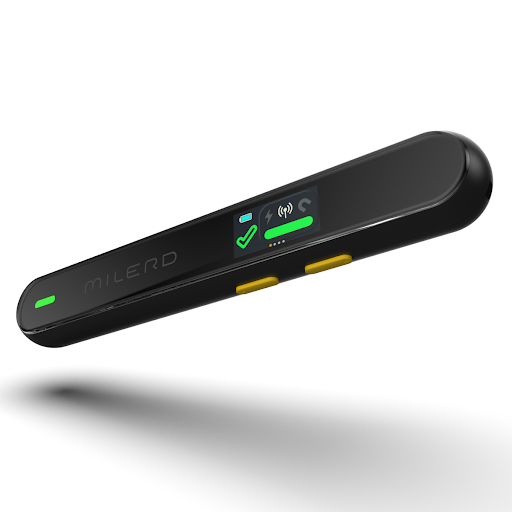
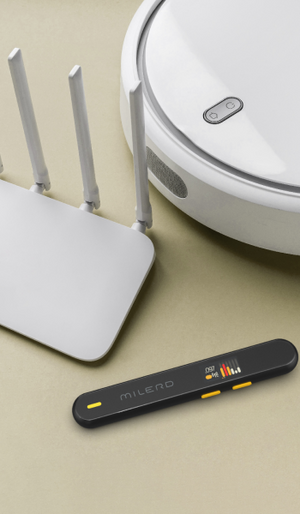
The portable emf meter gives you immediate feedback. You can move it around your laptop, screen, Wi-Fi router, and power strips to see which spots create the highest EMF levels and how quickly the numbers drop when you increase distance. Many people are surprised to discover that a small change, like shifting a router to the other side of the room, makes a visible difference in the reading.
If you want to go deeper, the best EMF detector does more than show a single number. It helps you understand both low- and high-frequency fields, see how EMF builds up during the day, and spot hidden “hot zones” in your home office. Instead of worrying in general, you can make targeted tweaks: move a device, switch to a wired connection in one place, create a calmer corner for focused work in another. Measuring takes the guesswork out of EMF and turns it into something you can observe, adjust, and control.
Everyday habits that quietly lower EMF from your computer
Once you have a sense of what is happening on your desk, the next step is to build small habits that naturally reduce EMF exposure. You do not have to turn your life upside down. Think of it as fine-tuning your space so your body feels less pressure while you work.
The easiest win is distance. The strength of EMF drops quickly as you move away from the source, so even a few extra centimeters matter. Set your monitor so you sit at a comfortable arm’s length instead of leaning in. If you work on a laptop, treat the built-in keyboard as a backup and use an external one so you can push the device further away. Avoid resting your laptop directly on your lap for long sessions; a table or stand instantly reduces how much laptop radiation reaches your body.
Connection type is another quiet lever. Whenever you can, choose wired over wireless. A simple ethernet cable means your computer does not have to constantly communicate with the router at close range. The same is true for accessories: a wired mouse and keyboard remove two small but continuous wireless signals from your home office EMF mix. If you enjoy wireless headphones, try using them only when you really move around, and switch to wired ones for long calls at your desk.
You can also reduce computer radiation by turning off what you do not use. If you are not actively connecting to Bluetooth devices, switch Bluetooth off. If your router has both 2.4 GHz and 5 GHz networks, you may not need both running all the time. Even simple cable management helps: keep power strips, chargers, and thick cable bundles away from your legs and torso instead of piled under your feet. None of these steps are dramatic, but together they create a softer, low-EMF workspace that supports how you want to feel during and after the workday.
Designing a low-EMF home office that still feels like you
Lowering EMF in your home office does not mean turning it into a lab. The goal is a space that feels calm, personal, and inspiring, while quietly working in your favor. Think of EMF protection for your home office the same way you think about lighting or ergonomics: it is part of how the room supports you.
Start with the layout. Place high-EMF devices, like the router, printer, or external hard drives, a little farther from where you sit. A shelf across the room or a corner behind you can keep them useful but out of your immediate field. Try not to stack every device directly around your chair; instead, create a small buffer zone so your main workstation remains a relatively low-EMF island.
Then look at how you divide the room. If you have space, keep a “screen side” and a “soft side”: one area with your desk, monitor, and tech, and another with a chair, plant, or yoga mat where you can rest with fewer signals around you. Even in a small apartment, moving chargers and spare gadgets away from your reading chair or bed helps. Over time, these small design choices turn your desk into an EMF-safer workstation and your home office into a place where both your mind and your nervous system can actually exhale.
Lifestyle rituals that support your body, not just your laptop
Even the best low-EMF setup works better when ваши ежедневные привычки идут в ту же сторону. A few simple rituals can soften the impact of long screen time and help your body reset after a day surrounded by devices.
Build in short breaks. Every 45–60 minutes, stand up, look away from the screen, and step out of your home office for a few minutes. This is less about productivity hacks and more about giving your nervous system a chance to breathe outside your usual EMF cloud. If you can, use part of that break to get natural light by a window or on a balcony.
Evenings are where lifestyle makes the biggest difference. Try switching your workspace into “night mode” at least an hour before bed: close the laptop, turn off unnecessary chargers and peripherals, move your phone away from the pillow, and dim overhead lighting. Reducing both light and EMF exposure at night makes it easier to fall asleep, stay asleep, and actually wake up restored instead of feeling like you never left your desk.
A smarter way to live with technology
Creating a safer computer space is not about fearing every signal or chasing a perfectly “pure” environment. It is about choosing a smarter way to live with technology. When you understand where EMF comes from, measure what is actually happening in your home, and tweak your setup with intention, you move from worrying in general to making clear, grounded decisions.
An EMF-aware lifestyle does not mean throwing out your favorite devices. It means using them in a way that respects your body: keeping distance where you can, turning off what you do not need, and checking from time to time whether your home office layout still supports you. EMF monitoring becomes part of the same routine as cleaning your screen or adjusting your chair — a quiet, regular check that keeps your space in line with how you want to feel.
This is where companies like Milerd come in. Instead of guessing, you can reach for tools that translate invisible fields into clear, readable numbers and help you see the effect of every change you make. With that kind of feedback, your computer, router, and other devices are no longer a mystery. They become part of a thoughtful, EMF-safer lifestyle in which your workspace is not just functional and beautiful, but also kinder to the body that spends so many hours there.