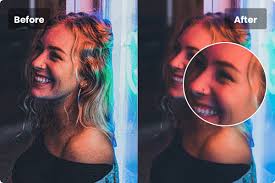
Video creators and everyday users often face a common problem: noisy, grainy, or unclear videos. This is especially true when shooting in low light or with basic cameras. Noise and grain can ruin the beauty and detail of your footage. Thankfully, there is a simple solution called UniFab Denoise AI, a tool made to help anyone clean up their videos quickly and well.
What Is Video Noise and Why Does It Happen?
Video noise looks like small dots, speckles, or grain in your video. It often happens in dark or low-light settings. When your camera sensor struggles to capture enough light, it adds random specks of color and shades called noise. Higher ISO settings or cheaper cameras make this worse. Video noise takes away sharpness and can ruin your final look.
Videos full of noise seem less professional and less enjoyable to watch. So removing noise is important if you want your videos to look their best.
How Does UniFab Denoise AI Work?
UniFab Denoise AI is a software that cleans noise using smart technology called artificial intelligence (AI). Unlike older programs that blur everything to hide noise, UniFab’s AI knows the difference between noise and real detail. It targets only the noise and keeps edges, textures, and colors sharp. This helps the video look natural and clear without making it soft or blurry.
With traditional noise reduction, you lose a lot of detail. But UniFab preserves the fine information in your video, like the lines on faces, fur on animals, or fine textures in nature scenes.
Easy to Use for Everyone
You do not have to be an expert to use UniFab Denoise AI. The user interface is simple and clear. Even beginners can clean their videos with just a few clicks. You can drag your files into the program and start the denoising process quickly.
There is also a free trial version with no watermarks. This allows you to test the software first before deciding to purchase it.
Speed That Saves Your Time
If you have many videos to clean, speed is important. UniFab Denoise AI is one of the fastest video denoisers on the market. For example, it can process a 20-second video in less than 30 seconds on a good computer. Other similar programs often take double or triple that time.
Thanks to support for modern graphics cards like Nvidia RTX series, UniFab runs faster and smoother. This is great news for video editors and creators who want results quickly.
Works Well with Many Video Types
No matter what kind of videos you have, UniFab can help. Whether you shoot wildlife in nature, family videos at night, or drone footage in the city, this software improves them all. It restores color, sharpness, and removes noisy spots.
Old video recordings also benefit. If you have grainy home videos from years ago, UniFab can make them look much cleaner and clearer.
Affordable Price with Lifetime License
UniFab Denoise AI offers a lifetime license for a price that is fair and lower than many competitors. This means you pay once and get to use the software forever, with updates included.
If you want simple, fast, and high-quality denoising without monthly fees, this is a great deal.
What Users Say
Many users praise UniFab for its ease of use and clear results. Creators on YouTube, video professionals, and regular users find it helpful to fix noisy videos and get sharp footage.
One user shared how they revived old family videos that were noisy and unclear. After using UniFab, the colors came back, and the grain was much less visible.
Final Thoughts
Taking care of video noise is important for anyone who makes videos. This AI Video Denoiser offers a powerful, easy, and affordable way to fix noisy videos. It works fast and keeps details intact. Whether you are a beginner or a professional, this tool can improve your videos and make them look more polished.
If you want to try it out, there is a free version to test. For anyone needing clearer and smoother videos, UniFab Denoise AI is worth a look.