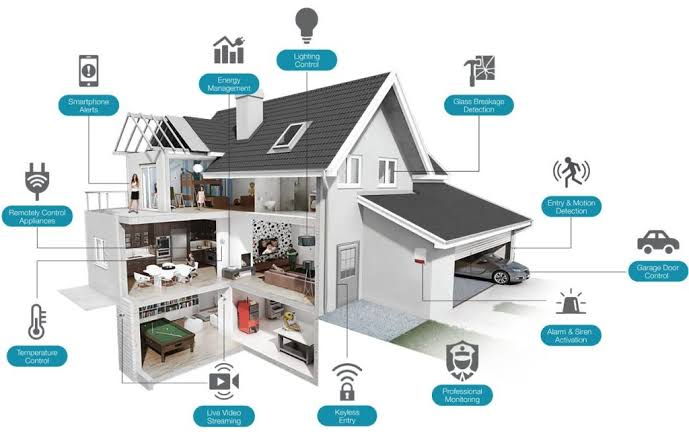
A smart home should not feel like a science project. At its best, it quietly handles the small jobs you repeat every day: turning off lights you forgot, warming the house before you wake, locking the door at night, and warning you about a leak before it becomes damage. The mistake many homeowners make is buying random gadgets first and trying to connect them later. A better approach is to start with one platform, automate one or two routines that solve real friction, and then expand room by room.
You do not need to automate everything at once. A starter setup — a hub or speaker, a few smart switches, a thermostat, and a doorbell camera — typically costs $400 to $900 and covers most daily tasks. Every new device should then earn its place by saving time, energy, or worry.
Choosing a Smart Home Platform
Your platform is the app and ecosystem that ties everything together. The main choices are Amazon Alexa, Google Home, Apple HomeKit, and Samsung SmartThings. Pick based on the phones in your house and the assistants you already use, not on a single device deal. If everyone uses iPhones, HomeKit feels natural. Mixed Android and iPhone households often do well with Alexa, Google Home, or SmartThings, which support wider device ranges.
Before buying anything, check for Matter and Thread on the box. Matter is the shared standard that lets devices from different brands work together, and Thread is the low-power mesh network many new devices use instead of crowded Wi-Fi. Choosing Matter-compatible products in 2026 protects you if you switch platforms later.
- Start with a hub: A smart speaker ($50–$100) or a dedicated hub gives you voice control, routines, and a Thread border router in one device.
- Check your Wi-Fi first: Most dropouts are router problems, not device problems. A mesh Wi-Fi system ($150–$300) fixes more issues than any gadget.
- Buy one brand per category: Mixing five lighting brands means five apps. Standardise, and setup and troubleshooting stay simple.
- Plan for manual control: Every automated light, lock, and thermostat should still work by hand when the internet goes down.
Lighting Automation
Lighting is the easiest win because you notice it immediately. For most rooms, smart switches are better than smart bulbs. A switch ($25–$50 each) controls the whole fixture, works with any bulb, and still behaves normally for guests. Use smart bulbs ($10–$20 each) where colour or individual lamp control matters, such as living room lamps and bedrooms.
Once the hardware is in, scenes do the real work. A single “Evening” scene can dim the living room to 40 percent, turn on the porch light, and switch off the hallway. Schedules handle the rest: porch and landscape lights on at sunset, kids’ room lights fading at bedtime, and a gentle 20-minute sunrise simulation instead of a harsh alarm.
- Motion sensors in pass-through spaces: Hallways, bathrooms, and laundry rooms ($15–$30 per sensor) are perfect for lights that turn on and off automatically.
- Vacation mode: Randomised evening lighting makes an empty house look lived in without leaving lights on all day.
- Label everything clearly: Names like “Kitchen Ceiling” and “Kitchen Island” make voice commands work first time, every time.
Climate and Thermostat Automation
Heating and cooling are usually the largest part of a home energy bill, so a smart thermostat is the automation most likely to pay for itself. Models from Google Nest, Ecobee, and Honeywell cost $130 to $250, and many utility companies offer $50 to $100 rebates. Most homeowners recover the cost within one to two years through reduced run time.
The savings come from three features. Scheduling lowers heating or cooling while you sleep or work. Geofencing uses your phone’s location to switch to an eco temperature when the last person leaves and recover before anyone returns. Room sensors ($30–$50) fix the classic problem of a thermostat in a cool hallway overheating the bedrooms — the system averages temperatures or prioritises the rooms you choose at night.
Set realistic targets. Shifting the setpoint by just 1–2 degrees during empty hours saves noticeably without the house feeling cold on return. Also enable filter reminders; a clogged filter makes any system work harder and cost more.
Security and Doorbell Cameras
Good home security is layered, not dependent on one camera. Start at the front door, where deliveries, visitors, and most unwanted attention arrive. A video doorbell ($80–$200) records motion, lets you speak to couriers from anywhere, and creates a clear record if a package disappears. Choose wired power if you have existing doorbell wiring — it removes battery charging and missed recordings entirely.
Add a smart lock ($150–$280) so you can give cleaners, family, or dog walkers their own codes instead of spare keys, see exactly when each code is used, and lock up automatically at night. Contact sensors on doors and ground-floor windows ($15–$25 each) complete the picture: one routine can check every entry point at 10 p.m. and alert you if anything is open.
- Camera placement: Cover the front door, driveway, and back garden first. One well-placed camera beats three aimed badly.
- Know the subscription cost: Cloud video storage usually runs $3–$10 per month per home. Check before buying, not after.
- Respect sightlines: Aim cameras at your own property, angle them away from neighbours’ windows, and tell regular visitors cameras are present.
Voice Assistants and Routines
Voice control feels impressive for a week; routines are what save you time for years. A routine chains several actions to one trigger — a phrase, a time, a sensor, or your arrival. Build routines around moments that happen every day rather than clever one-off commands.
- Good Morning: At 6:45 a.m., bedroom lights rise slowly, the thermostat warms the bathroom, and the speaker reads the weather and calendar.
- Leaving Home: One phrase — “I’m leaving” — locks the doors, turns off all lights, sets the eco temperature, and arms the cameras.
- Good Night: Doors lock, downstairs lights go off, the garage door is checked, and white noise starts in the kids’ rooms.
- Movie Night: Living room lights dim to 10 percent, blinds close, and the TV and soundbar switch on together.
Keep voice assistants where they help most: the kitchen for timers and lists, the bedroom for alarms and lights. Use manual controls in guest rooms, and review voice recordings in the app every few months, deleting anything you do not want kept.
Kitchen and Appliance Automation
The kitchen benefits more from alerts and small helpers than from expensive smart appliances. A smart plug ($12–$25) on the coffee maker means coffee starts with your alarm. The same plug on an older washing machine can notify you when the cycle ends, because power use drops to near zero. Under-sink and behind-appliance water leak sensors ($20–$35) are arguably the best value in this whole article: a slow leak caught in an hour costs a towel, while one caught in a month costs flooring and cabinets.
When you do replace major appliances, smart features worth paying for are specific: an oven you can preheat on the way home and that alerts you if left on, a fridge that warns when the door is ajar, and a dishwasher that runs at off-peak electricity times and reports leaks. Skip features you must operate from the appliance panel anyway — connectivity alone is not a benefit.
Voice shopping lists, named kitchen timers, and a small smart display for recipes ($80–$130) round out a kitchen that helps while your hands are covered in flour.
Privacy and Security Basics
Every connected device is also a small computer on your network, so basic security habits matter. None of this is complicated, but skipping it is how accounts and cameras get compromised.
- Use unique passwords and two-factor authentication: Especially for the main platform account — it controls your locks and cameras, not just an app.
- Turn on automatic updates: Firmware updates patch real vulnerabilities. Enable them for the hub, router, cameras, and locks.
- Create a guest or IoT network if your router allows it: Keeping smart devices separate from laptops and phones limits damage if one device is compromised.
- Audit connected apps twice a year: Remove old integrations, former housemates’ access, and devices you no longer own.
- Prefer local control where possible: Devices that keep working through Matter and a local hub expose less data and fail less often.
Also check camera and microphone settings carefully. Disable features you will never use, such as voice purchasing, and know how to mute or unplug any device.
Final Thoughts
The homes that stay smart for years are not the ones with the most devices. They are the ones built slowly, around real habits: lights that follow the evening, a thermostat that knows the house is empty, doors that confirm they are locked, and alerts that arrive only when something truly needs attention. Choose one platform, start with lighting, climate, and the front door, and let each successful routine justify the next purchase. Done that way, automation stops feeling like technology to manage and simply becomes how your house looks after you.
Frequently Asked Questions
How much does it cost to start a smart home?
A useful starter setup costs about $400 to $900: a speaker or hub, three to four smart switches, a smart thermostat, and a video doorbell. You can begin for under $150 with a speaker and a few smart plugs or bulbs, then add devices gradually as routines prove their value.
Will my smart home still work if the internet goes down?
Mostly, yes — if you plan for it. Lights on smart switches, locks, and thermostats keep working manually, and Matter and Thread devices on a local hub keep following basic schedules. Voice control, remote app access, and cloud camera recording usually pause until the connection returns.
Can I automate a rented home?
Yes, with removable devices. Smart bulbs, plugs, leak sensors, battery doorbells, and plug-in motion sensors need no wiring and leave with you. Avoid replacing switches or thermostats unless your landlord agrees in writing, and keep the original fittings to restore when you move.
What if I already own devices from different brands?
Check whether they support Matter, or connect to Alexa, Google Home, or SmartThings. Most mainstream brands made in the last few years can be gathered into one app even if they were bought separately. Truly orphaned devices can stay in low-priority roles, like a spare-room lamp.
What should I automate first?
Start with the friction you feel daily. For most households that means front-door security, living room and porch lighting, and the thermostat. Those three areas deliver visible savings and convenience in the first week and teach you how your platform works before you spend more.